
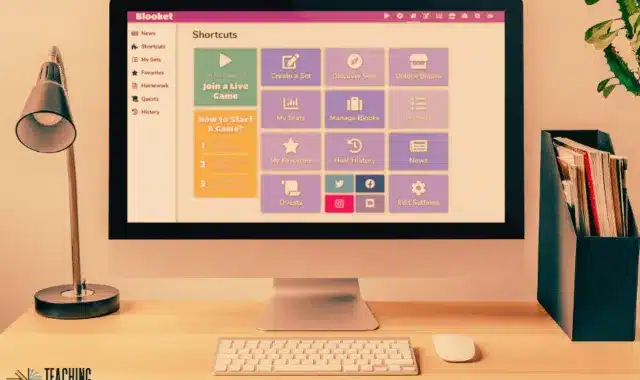

The true magic of educational technology lies not just in the software itself, but in the community that fuels it. For teachers across the globe, Blooket has become a staple for classroom engagement, but creating high-quality content from scratch for every single lesson is a daunting task. This is where the Blooket Discover feature comes into play. It acts as a massive, searchable library of millions of pre-made question sets created by educators, students, and subject matter experts. By leveraging these public sets, teachers can transform their prep time from hours into seconds, ensuring that students get high-quality review material without the administrative burden on the instructor.
The Power of Community-Driven Content
At its heart, Blooket Discover is a crowdsourced repository. Every time a user creates a set and marks it as “public,” it becomes part of a global resource. This means that if you are teaching a niche topic like the “Treaty of Versailles” or a broad subject like “7th Grade Life Science,” someone has likely already built a comprehensive question set for it. The “human touch” in these sets is evident; you’ll find questions infused with classroom humor, specific regional curriculum standards, and diverse perspectives that a standard textbook might miss. Finding these gems requires a bit of strategy, but once you master the search filters, the possibilities for your classroom are endless.
How to Navigate the Discover Tab Like a Pro
When you first click on the “Discover” tab in Blooket, the sheer volume of content can be overwhelming. To find the “best” sets, you need to look beyond the titles. Start by using specific keywords. Instead of searching for “Math,” search for “Quadratic Equations” or “Long Division with Decimals.” The search bar is powerful, but the true secret to quality lies in the “Verified” and “Top” filters. Blooket highlights sets that are trending or frequently used by other teachers, which serves as a built-in quality control mechanism. If a set has been played 50,000 times, there is a very high probability that the questions are accurate and the pacing is appropriate for a standard class period.
Evaluating Quality Before You Play
Before you launch a game, it is crucial to audit the set. Nothing kills classroom momentum faster than a typo in a question or an incorrect answer key. Blooket makes this easy by allowing you to “Preview” every question in a set without starting a game. You can scroll through the list, check the images, and verify that the difficulty level matches your students’ current progress. If you find a set that is almost perfect but needs a few tweaks, Blooket allows you to “Duplicate” it. This creates a copy in your personal dashboard that you can edit, allowing you to add your own inside jokes, remove overly difficult questions, or align the language with your specific textbook.
Maximizing Classroom Efficiency with Public Sets
Efficiency is the primary reason why the Discover feature is the most-used part of the platform. Instead of spending your Sunday night writing multiple-choice questions, you can spend that time analyzing student data or planning more interactive hands-on activities. The ability to find and launch a game in under 30 seconds makes Blooket a perfect tool for “bell-ringers” or “exit tickets.” If you find that a lesson ended five minutes early, you can quickly jump into the Discover tab, find a review set for that day’s topic, and keep the students productive and engaged until the bell rings.
Blooket Discover Feature Breakdown
| Feature | Functionality | Best Use Case |
| Search Bar | Scans millions of public sets by keyword | Finding specific curriculum topics |
| Preview Mode | Shows all questions and answers before play | Ensuring accuracy and difficulty level |
| Copy/Duplicate | Saves a public set to your personal library | Modifying content for specific class needs |
| Verified Sets | Highlights sets from trusted creators | Guaranteeing high-quality, error-free sets |
| Favorites | Allows you to “star” sets for later | Organizing your semester’s game schedule |
| Image Integration | Shows if questions include visual aids | Best for Geography or Science diagrams |
| Question Count | Displays total number of questions | Choosing sets for short vs. long sessions |
Sharing Your Own Expertise
The ecosystem of Blooket Discover only works because teachers are willing to share. When you create a set that works perfectly for your class, making it public is a way to give back to the educational community. High-quality sets often include clear, high-resolution images, varied distractor answers (the “wrong” choices), and a logical progression of difficulty. By sharing, you contribute to a global library that helps teachers in under-resourced schools access top-tier materials. Furthermore, seeing your set gain “plays” and “favorites” is a rewarding form of professional validation, proving that your pedagogical approach resonates beyond your own four walls.
The Strategy of Tagging and Titling
If you want your sets to be found and used by others, you must think like a search engine. Titles should be descriptive and include grade levels (e.g., “Grade 5 Vocabulary – Unit 3”). Using relevant tags and clear descriptions helps the Blooket algorithm categorize your content. For example, if you create a set for Common Core State Standards, explicitly stating the standard code in the description makes it infinitely more valuable for other teachers following the same curriculum. This level of detail transforms a simple quiz into a professional teaching resource.
Curation: Building Your Own Digital Library
Once you start using Blooket Discover frequently, you will notice that certain creators consistently produce high-quality work. You can “Follow” these creators to see their new sets as they are published. Curation is the final step in mastering the platform. Rather than searching from scratch every time, you should build folders within your dashboard organized by unit or semester. This organizational habit ensures that your most successful games are always just one click away, allowing for seamless integration into your Learning Management System (LMS) like Google Classroom or Canvas.
Gamifying the Content Search for Students
Some teachers take the Discover feature a step further by involving the students. You can assign students the task of finding the “best” public set for a topic and defending their choice based on the quality of the questions. This not only saves you work but also teaches students digital literacy and evaluative skills. They learn to spot errors, analyze the “fairness” of questions, and understand what makes a high-quality educational resource. It turns the preparation process itself into a learning opportunity.
Common Pitfalls and How to Avoid Them
While Blooket Discover is a goldmine, it is not without its risks. Because anyone—including students—can create and publish sets, you will occasionally find content that is inappropriate or intentionally misleading (“troll” sets). This is why the “Preview” step is non-negotiable. Additionally, some sets might have images that are broken or no longer hosted. A quick 60-second scan of the set prevents these issues from becoming a distraction during live gameplay. Always prioritize sets with high play counts and positive creator reputations to ensure a smooth experience.
FAQs
Q1: Is there a limit to how many public sets I can save?
On the free version of Blooket, you can save and host an unlimited number of public sets. However, there is a limit to how many folders you can create to organize them unless you upgrade to Blooket Plus.
Q2: Can I merge two different public sets together?
Currently, Blooket does not have a “merge” button. The best workaround is to duplicate both sets and then manually copy questions from one into the other using the “Add Question” feature in the set editor.
Q3: How do I know if a set is aligned with my state standards?
Search for the specific standard code (like “SS.8.H.1”) in the Discover search bar. Many teachers include these codes in the title or description of their sets.
Q4: What should I do if I find a set with incorrect information?
You cannot edit the original creator’s set, but you can “Duplicate” it to your own library and fix the error. If the content is offensive or violates terms of service, use the “Report” feature.
Q5: Can students search the Discover tab?
Yes, students with accounts can search for and play public sets in “Solo” mode. This is a great way for them to study independently outside of class.
Q6: Are the images in public sets copyright-protected?
Blooket encourages the use of royalty-free images or those available through their integrated search. If you are sharing a set publicly, it is best practice to use images that are cleared for educational use.
Q7: Why can’t I find a set I saw yesterday?
The creator may have changed the privacy setting from “Public” to “Private”, or the set may have been deleted. If you find a set you love, always “Favorite” it or “Duplicate” it immediately to ensure you don’t lose access.
Conclusion
The Blooket Discover tab is more than just a search engine; it is the heartbeat of a global community of educators dedicated to making learning fun. By mastering the art of finding, evaluating, and modifying public sets, you can significantly reduce your workload while providing your students with a diverse and engaging curriculum. Whether you are looking for a quick review game or a deep-dive formative assessment, the “Best Public Question Sets” are already out there waiting for you. Embrace the collective intelligence of the Blooket community, and watch your classroom engagement soar to new heights.